This website is for educational purposes and is not meant to replace the advice of a medical professional. This post may contain affiliate links, which means I’ll receive a commission if you purchase through my links, at no extra cost to you. Please read full disclosure for more information. Thanks so much for visiting my website/blog.
How to Create a Vision Board Using Your Cellphone (Yes, Just ONE Picture Works!)
Wouldn't it be nice if you could use your cellphone as your vision board? Well, I'm here to tell you that you absolutely can!
When people hear vision board, they think they need a giant poster, 50 magazine cutouts, and a glue stick that always seems to disappear when you need it most.

Sis… no.
Creating a vision board is so much simpler, and honestly, even more powerful when you do it right from your phone.
In fact, one picture can shift your energy, set your intentions, and literally change your life. Yep, and I'm proof of that.
Today, I’m walking you through how to create a cellphone vision board—plus I’m sharing the exact story of how I manifested the sale of two homes with nothing but a photo, visualization, and aligned energy.
If you still want to create a regular vision board with cutting out pics, affirmations, and all the things while needing to paste, then go for it, friend!
Why a Cellphone Vision Board Works
Your phone is always with you, right? That means your vision is always with you too.
No forgetting, no leaving it in a drawer, no “I’ll finish it later.”
And when you use just one powerful image, your mind has one clear target to lock onto. Clear energy = fast manifestation.
How to Create a Vision Board Using Your Phone
1. Choose ONE image that captures your intention
This could be:
- Your dream body
- A single word that embodies your next season
- A picture of a house, car, job, relationship—whatever you desire
- A photo of something you already own or are connected to
Sometimes less is truly more. One image removes clutter and creates clarity.
2. Set it as your lock screen or home screen
You will see it dozens of times per day—and every viewing becomes a micro–manifestation moment.
3. Visualize for 5–10 seconds whenever you look at it
Not a long meditation—just a quick “yep, this is mine.”
Feel the energy. Feel the gratitude. Feel the alignment.
4. Attach good energy to the image
Every time you look at it, think:
✨ “This is already happening.”
✨ “I’m aligned with this vision.”
✨ “This is flowing to me quickly and easily.”
This raises your vibration and sends out a clear signal to the universe.
5. Take aligned action when opportunities show up
Manifestation is always energy + intention + movement.
How I Manifested the Sale of Two Homes Using Just One Picture
Let me share something personal with you.
Home #1 — Right Before We PCSed
We had about three months to sell our home before moving to a new area. Stressful, right?
But instead of panicking, I did something simple:
I chose ONE photo of the house—it was the exterior of the house with the for sale sign—and used it as the lock screen on my phone.
But instead of keeping the for sale sign, I changed it on my phone to SOLD!
Every time I looked at it, I visualized:
- Happy new owners walking inside
- A smooth, fast process
- Us packing up peacefully
- A blessing for the next family
I kept my energy calm and grateful.
Within weeks, everything aligned perfectly. The sale moved quickly, cleanly, and with no drama.
It's funny because I remember giving our realtor a date by which the house would sell. She responded like, Oh, ok, like I was a bit nutty. haha 😆 But it sold within a few days of the date that I gave her.
Home #2 — During the Pandemic
Now this one was wild because everyone kept saying, “This is the worst time to sell.”
But I don’t subscribe to fear-based timelines, and besides, the family who were renting were moving out, and we did not want to rent again, so we decided to sell.
It's during these times that we must trust the timing of the Universe.
I picked one picture of the house, as I did before, of the exterior but this time doctored it by writing SOLD (pic below) and followed the same steps—lock screen, visualization, good energy.
I imagined:
- A buyer falling in love with it instantly
- A smooth inspection
- A fast closing
- That same clean, peaceful feeling
- A beautiful energy glow around it
And guess what?
Same result.
Quick sale. Minimal stress. Full alignment—even during one of the most unpredictable times in real estate.
Two homes.
Two pictures.
Two fast manifestations.
That’s the power of focused intention.
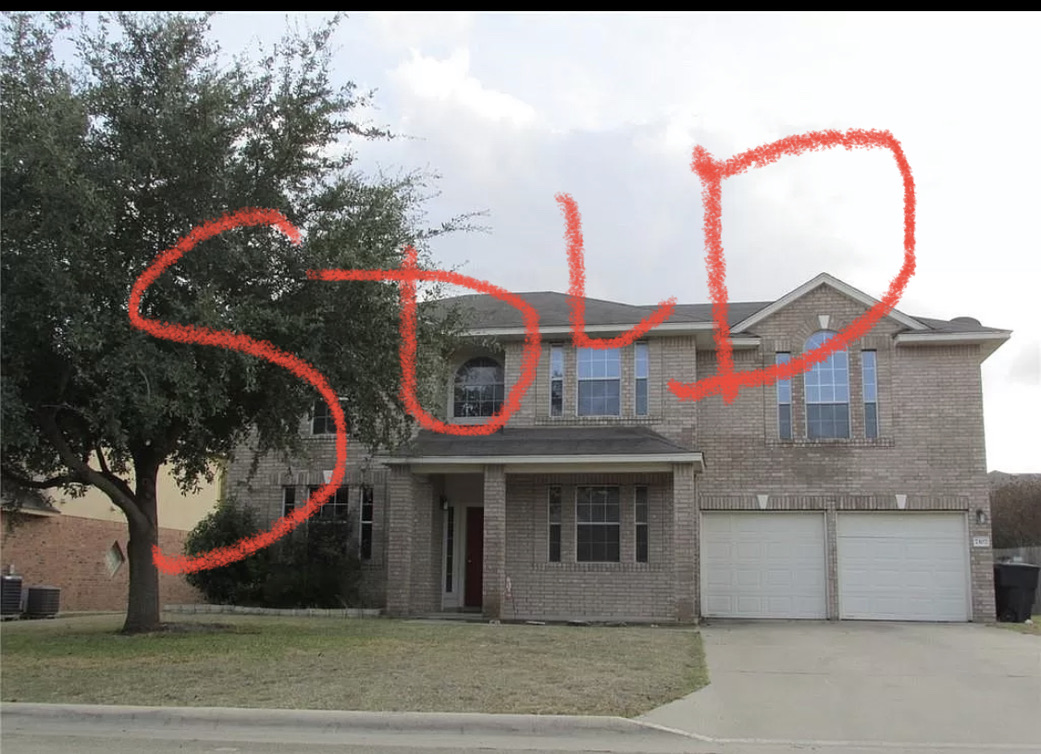
Our home was sold during the pandemic in 2021.
Why One Picture is Enough
A vision board doesn’t need to overwhelm you.
It needs to direct your energy.
One picture:
- Is easy to connect with
- Becomes part of your daily routine
- Creates laser focus
- Strengthens your visualization practice
- Raises your vibration every time you see it
Sis, don’t underestimate the simplicity of your phone wallpaper.
Your vision only needs clarity—not clutter.
How I “Pre-Sold” My Home Spiritually Using a Cellphone Vision Board
Ok, more about that doctored picture that I mentioned before.
This is really fun—so again, I doctored the “For Sale” sign in the photo of the house.
I took a picture of the real-estate sign, opened it on my phone, and used a simple editing tool to write the word “SOLD” right across it. I made it look like the home was already purchased.
That photo became my lock screen.
Every time I picked up my phone, I saw a home that was no longer “for sale”—it was sold, claimed, and moving on to its next owners. That shift in energy made me feel calm, grateful, and detached in the best way.
It wasn’t just a vision… it became my new energetic reality.
I clapped, sang, shouted 🤣 that our house was sold each time I look at the photo. The energy was simply ah-mazing!
And honestly? That tiny edit made a huge difference. Instead of seeing something I needed, I saw something that was already mine (or in this case, already done). That’s powerful manifesting energy.
Try This Cellphone Vision Board Today
Choose your picture.
Set it as your wallpaper.
Hold the vision.
Trust the energy.
Move in alignment.
Your manifestations will start flowing faster than you think.
Multiple Pictures, No Problem (Easy Options You Can Do Today)
Even though one photo is incredibly powerful, you can create a multi-image vision board right from your cellphone if you prefer something more visual.
Here are a few simple options:
Option 1: Use Canva on Your Phone
This is my go-to.
- Open Canva on your phone
- Search “Phone Wallpaper”
- Choose a minimal template you love
- Upload your images
- Arrange them in a clean, uncluttered layout
- Add a word or short affirmation if you want (“Aligned,” “Abundance,” “Sold,” “New Beginnings,” etc.)
- Download and set it as your lock screen or home screen
Canva makes it super easy to drag, drop, resize, frame, and layer your images without needing graphic-design skills.
Option 2: Use Your Phone’s Built-In Photo Editing Tools
Most phones have surprisingly good editing features:
iPhone Steps:
- Open Photos → choose your picture
- Tap “Edit” → use the Markup tool
- Add text, circle images, or write your word of the year
- Or use “Add Photo” in iOS to place smaller pics on top of a main photo
Android Steps (varies slightly):
- Open your image
- Tap Edit
- Use Stickers, Text, or Collage mode
- Add your images into one frame
- Save and set as wallpaper
This method lets you create a collage without downloading anything new.
Option 3: Use a Collage App
If you want something super quick, try:
- Layout by Instagram
- PicCollage
- PhotoGrid
Pick your images → choose a grid → export.
Done in under 2 minutes.
You're already manifesting so why not be intentional. 💫
What do you think about this post? Leave a comment below. ✨

Welcome to my website and the Manifest Life blog. Let's Intentionally Manifest together! Learn more about me. 💛
Let's Connect

Don't Miss Any Content
Get alerted by hovering on the orange button below and then the green follow button to always be up to date on my new posts. Happy Reading Sis!
Recent Blog Post


-
Create a CellPhone Vision Board
Nov 28, 25 10:15 PM
 Create a powerful vision board on your cell phone using just one image. Learn how I used this method to manifest the fast sale of two homes.
 -
Manifest A Peaceful Holiday Season: A Guide to Joy, Love and Ease
Nov 25, 25 11:09 PM
Discover how to manifest a peaceful holiday season with simple rituals, affirmations, and mindset shifts. Create calm, joy, and ease during the holidays. -
How I Manifested My First Commerical
Nov 20, 25 08:32 PM
 How I manifested my first commercial through visualization, scripting, inspired action, and trusting the Universe even when timing didn’t make sense.
 -
What to Do After 11/11 to Keep Moving Toward Your Manifestation
Nov 16, 25 12:10 PM
Learn what to do after 11/11 to stay aligned with your manifestations. Keep the momentum going with these post-11/11 steps, rituals, and mindset shifts.




Let's Connect
Copyright © 2025 | VerronicaM
Terms of Conditions | Privacy | Disclaimer
This website is a participant in the Amazon Services LLC Associates Program, an affiliate advertising program designed to provide a means for sites to earn advertising fees by advertising and linking to amazon.com.
New! Comments
Let me know if what I said resonated with you. Leave me a comment in the box below.